Easy Guided Forms in Microsoft Word
Hit File New, and you'll see a Fax cover template among other forms that are provided by Word when you install it. These kind of forms guide the user more so than restrict the user, as do online forms.
These are very easy to create. You can either copy one of the "Click and type" areas off of an existing template sample form, or you can create your own "Click and type" area. Either way, when the user clicks on the field, the entire field is selected, and when the user types, the entire area is replaced.
This method will not work with long "Display text" descriptions.
- From the menu, choose Insert Field. Choose All fields from the Categories list, and choose MacroButton from the Field names list. Type the text you'd like to display in the Display text box.

-
Then hit the Field Codes button at the bottom left of the dialog. Change the assigned macro (AcceptAllChangesInDoc) to say NoMacro, as shown. Hit OK.

-
Your field appears in the document.
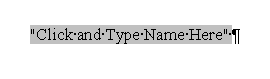
Click Alt+F9 to see the field code behind the field.

-
You can copy and paste this field anywhere you need another field, changing just the text between the quotes to suit your needs.
-
Hit Alt+F9 to turn off viewing of the codes.