Change Page Orientation or Margins in Microsoft Word
To change the page orientation or the margins within a Word document requires that you use section breaks.
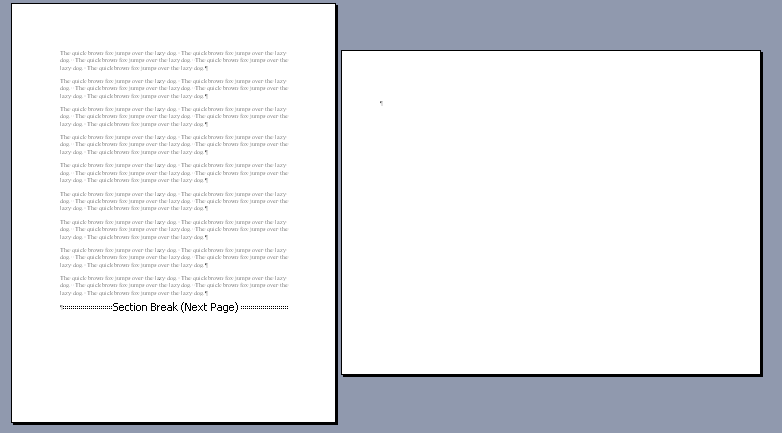
Our graphics demonstration creating a landscape page, but the steps are the same for changing margins.
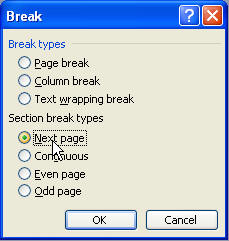
- Go to the bottom of the page prior to the landscape page or prior to the page where you'll change your margins. Hit Insert Break and choose Section Break, Next page. If you had already placed a page break, you may now need to delete it because it'll be extra. I always recommend that, whenever possible, you first insert a paragraph return prior to inserting a section break, so the section break is more easily seen.
-
If you are going to go back to your previous orientation or margins, you should go to the end of the area where you want the different orientation or margins, and insert another section break using the same method.
-
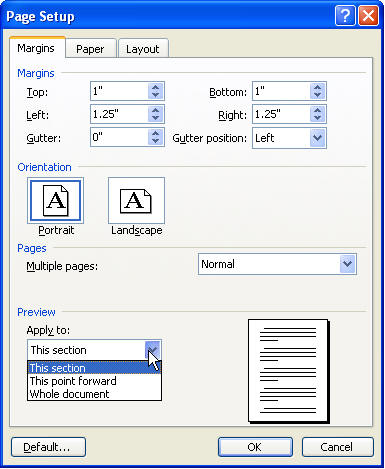
Now, place your cursor inside the section that you want to set up differently. Go to File Page Setup and change your orientation or margins. Be sure to change the Apply to drop-down to suit your needs. For instance, if you've inserted 2 section breaks, and want only this section to have different orientation, choose This section from the drop-down.