SUMPRODUCT Formulas in Microsoft Excel
Excel
For the ultimate resource in SUMPRODUCT, see Bob Phillips' site.
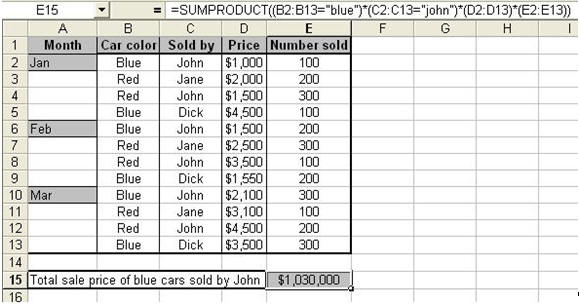
Suppose you need to total records based on multiple criteria? For example, in the following, we calculate the total quarterly price of blue cars sold by John.
Use the SUMPRODUCT function as shown below
SUMPRODUCT multiplies corresponding cells in a given set of data.
Let’s go into the formula step-by-step.
In our example, our criteria are (1) Blue cars and (2) sold by John. We need the total sales based on these two criteria.
We want Excel to
- Select only the rows that meet the above criteria. (B2:B13="blue") and (C2:C13="john")
- Multiply (PRODUCT) Price per car (D2:D13) by Number of cars sold (E2:E13)
- Return the total (SUM) as the result of the formula (all the * do the multiplying for us).