Show Leading Zeroes in Microsoft Excel
Excel
There are a number of ways to perform this.
If you already have data.
Choose the cells, column, or row. Go to Format Cells. On the Numbering tab, choose Custom under Category, and in the Custom dialog box, type the number of digits you want to use in your data, thusly:
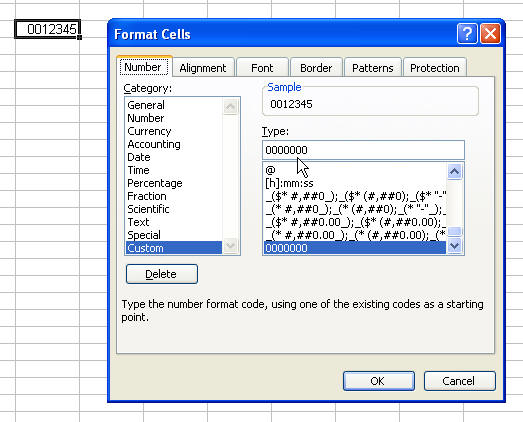
The above example would be for 7-digit account numbers or check numbers, etc. Zip codes can use the built-in Special format, so choose Special instead of Custom.
If you don't have any data yet, you can simply format your range as Text.
If you just want to enter a few cells with leading zeroes, there's no need to format the cells special-you can just type an apostrophe before you enter the values.