Remove VBA Code From a Workbook in Microsoft Excel
If you need to do this often, find out how to do it programmatically (using VBA to remove VBA).
But if you're no coder, like I'm no coder, you can do it manually, like this:
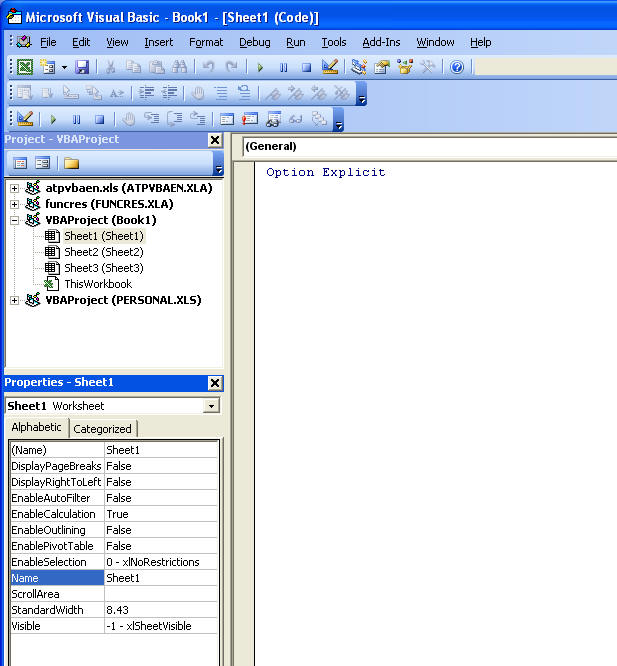
- Hit Alt+F11 or Tools Macro Visual Basic Editor to open the VBE. If your window doesn't look somewhat like the graphic below, go to the View menu and choose each of the following: Code, Project Explorer, Properties Window. (I don't show the entire window, but most of it.)
-
If you only have one workbook open, it'll be the VBAProject(WorkbookName) in the Project Explorer window. In this case, I am using Book1.
-
Double-click each sheet tab, and make sure there's no code in the window at right-NONE. You can click in the code window and hit Ctrl+A and then hit your Delete key.
-
Double-click ThisWorkbook, and make sure there's no code in the code window.
-
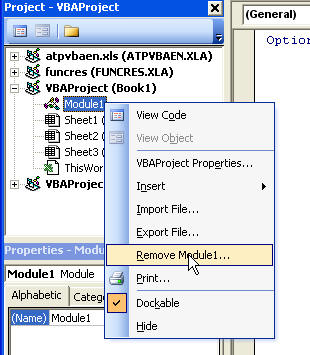
You may also have something called a Module and your Project Explorer window will look more like the one below. Right-click any modules and choose Remove. If you want to completely delete the code, you can say NO when asked if you first want to export the module.
Your workbook should now be code-free and you shouldn't get the macro warnings anymore.