Delete Duplicates in Microsoft Excel
Excel
Sort your sheet by the column in which you're trying to find duplicates. For our example formula, our data is in column A.
In a spare column (we're using column B), use the following formula:
=IF(A1=A2,1,0)
Copy the formula down, using the fill handle.
Click anywhere in your data, and hit Data - Autofilter.
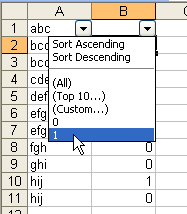
From the Autofilter dropdown in your spare column (we're using column B), choose 1. You'll see only those rows that returned a 1 as a result of the formula above, which means they're all duplicates.
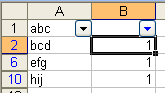
Select all the rows you see, and delete them. Turn off the Autofilter by going to Data -Autofilter. Delete the column in which you typed your formula.