Cursor Keeps Selecting Cells in Microsoft Excel
Excel
You aren't holding your mouse button down, but Excel acts as if you are, and continues to select cells you don't want to select. Rebooting might help temporarily.
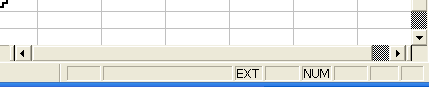
This can be caused by the wheel on your wheelmouse being stuck in a down position or by hitting the F8 key. Either of these actions turns on "Extend selection". You'll likely be able to tell right away if that's the cause. Look in the Status bar, and you'll see EXT. Just hit F8 to turn it off. (Thanks to BabyCody for pointing out about the F8 key!)
If that's not the case, and it continues to be a problem, then clean up your hard drive because it happens as a result of dwindling resources.