Cell Locking in Microsoft Excel
Excel
There's pretty much just two reasons for locking cells:
- To restrict entry (locked cells may not be changed)
- To allow tabbing to different cells for entry (unlocked cells can be tabbed through)
The points you should know are these:
- All cells are locked by default
- Cell locking doesn't take effect until you protect your worksheet (Tools Protection Protect Sheet to "lock" or Tools Protection Unprotect Sheet to "unlock")
- If you want most cells locked, then only unlock those you want users to be able to change
- If you want most cells unlocked, then unlock them all first, and then lock only those you want prohibit users from changing
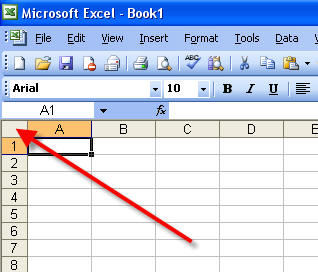
Select All Cells
Just click the button above Row 1 and to the left of Column A. This selects all the cells on your worksheet.
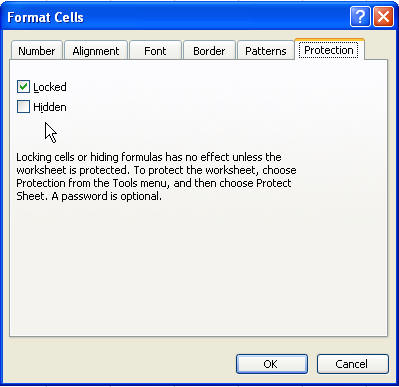
Lock/Unlock Cells
Go to Format Cells. Choose the Protection tab. Lock or unlock the cells as desired.
You can quickly lock/unlock cells by locking or unlocking one or more cells, then continue by using the F4 button, which repeats the last command. So, while you may have 30 different cells on a worksheet that you want to unlock, you can select, F4, select, F4...